Validate budget variance
For each piece of equipment registered in AMT, it initially has a budget projection, and then copied from that is the current projection. Therefore, on day one, the budget and current projections will be identical. It is important to ensure that the budget was set up correctly because it is the baseline for future analysis.
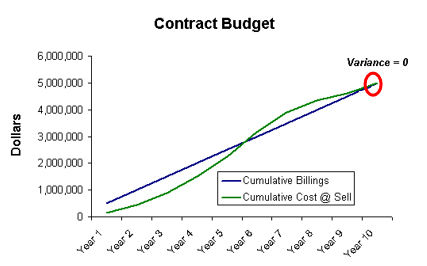
The circled area on the image above is the amount the customer will be invoiced for the contract balances to the cost of work to be performed.
The cumulative budget billings total should equal the cumulative budget cost at sell total (that is, budget variance = 0).
The only time there is an exception to this rule is if there has been a discount applied to revenue but not costs (resulting in a negative variance) in order to win the contract, or the capturing of overhead costs and revenue is mixed (that is, overhead revenue might be included in the equipment billing rate but the overhead costs are not).
To validate budget variance
-
Use the Dashboard to identify equipment with a significant budget variance.
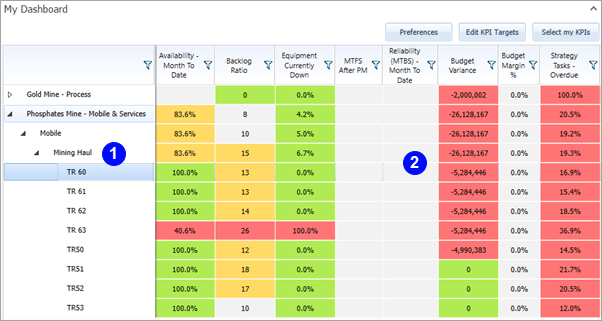
1 Drill down to equipment level. 2 Budget Variance per equipment.
-
Dashboard budget variance interpretation:
-
A Positive variance = Total Budget Billings > Total Budget Projection Costs (unescalated) for the entire contract period.
-
A Negative variance = Total Budget Billings < Total Budget Projection costs (unescalated) for the entire contract period.
-
Budget cost calculations are made using cost at sell (unescalated).